

Which Features Should I Include in My Custom Home Office?
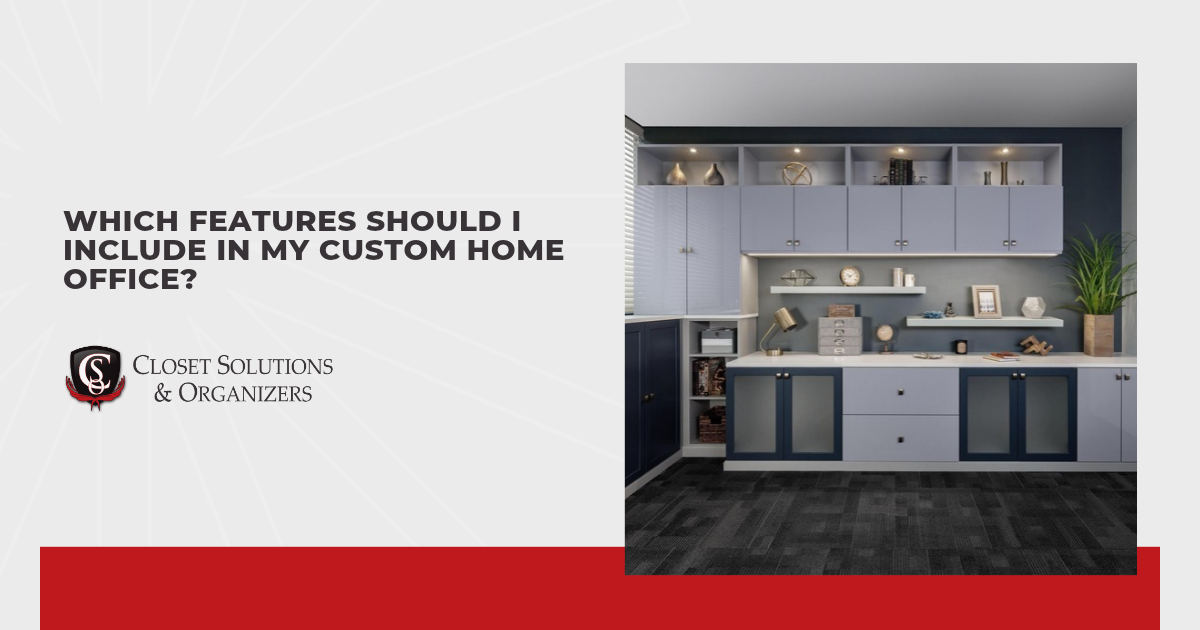
Having to move a stack of papers just to open your laptop gets old pretty quickly. Maybe there’s enough room to work, but nowhere nearby for the supplies you use throughout the day. When planning a custom home office, I want to help you pinpoint those little frustrations because they explain which features would actually be useful to you. Desk space, accessible storage, comfortable equipment placement, and good lighting all deserve attention.
Some jobs involve spreading out documents and keeping reference books close, while others need little more than a screen and a notebook. Shared rooms add another consideration, especially if someone else uses the desk after you’ve finished. Even a small detail, such as where a drawer opens or how you reach a charger, can affect how comfortably the space works. Those details are worth getting into the plan early, since that gives you a chance to address them before the cabinetry goes in.
These are the features that make a home office work day to day, along with how to decide which ones you need:
- Desk size and layout
- File drawers and paper storage
- Closed cabinets and open shelves
- Keyboard trays and ergonomic details
- Cable and equipment management
- Lighting for dark winter mornings and evenings
- Durable finishes and hardware
Desk size is a useful place to begin, since everything you keep on the desk affects how much room you have left to work.
Desk Size and Layout
One laptop and a notebook usually fit on a fairly compact desk, but adding a second monitor changes that quickly. In a custom home office, the desktop needs enough width for your equipment and enough depth to leave usable space in front of it. Paperwork, sketches, or an open binder also need somewhere to sit while you’re using the computer. Surface that looked generous on the plan fills up before you’ve even started working.
Before choosing dimensions, I like to see your usual equipment and an open project laid out on a table. Measurements from that setup give you real numbers to work with, which beats guessing from an empty desktop. Straight desks cover everything you need along one wall when the work stays in one spot. L-shaped layouts offer a second surface for work you want to leave out between sessions. Corners need attention so they don’t become deep pockets where things are hard to reach.
Space beneath and around the desk matters as much, though nobody thinks about it until the chair hits something. Drawers on both sides add storage but leave too little room for your chair and legs. There needs to be space to pull back without bumping into furniture behind you. Nearby cabinet doors and drawers shouldn’t force you to move the chair out of the way each time they open. Smaller desks with separate storage are easier to live with in a crowded room.
File Drawers and Paper Storage
Once there’s enough room on the desk, the next question is where paperwork goes when you’re finished with it. Bills waiting for payment need a different spot from records you only check once a year. Small trays can hold papers that still need attention, while file drawers keep documents sorted after you’ve dealt with them. Two separate places make it easier to notice unfinished tasks without going through everything again.
How much filing space your home office needs depends on how much paper you actually keep. If you work mostly online, one drawer may be plenty, which leaves more room for other supplies. I wouldn’t devote a whole cabinet to files unless your paperwork calls for it. For documents you use regularly, full-extension drawers let you reach folders at the back. Drawers and their filing supports also need to suit your paper sizes, especially if you keep both letter- and legal-size documents.
Small supplies deserve a place nearby, too. Pens, paper clips, and sticky notes are easier to sort in a shallow drawer with dividers than in a deep drawer where they collect in layers. Some spare filing room lets you add folders without squeezing them into a row that’s already packed. Duplicate printouts and empty folders can make the pile look bigger than it is, so clearing them out first gives you a clearer picture of what needs to fit.
Closed Cabinets and Open Shelves
Reference books are easier to grab from an open shelf, but spare stationery and supply boxes may be better behind a cabinet door. Both types together give you options without putting everything on display. In a home office that shares a guest room or living area, closed storage can also help you put work out of sight when you’re done for the day. Open shelves leave room for the books you use often and a few personal pieces you enjoy seeing.
Shelf spacing is as important as the number of shelves. Tall binders need more clearance than notebooks, while smaller supplies leave wasted gaps in a layout that doesn’t adjust. Adjustable shelves let you change that spacing as the contents change. Depth matters too, because a shelf that holds two rows of belongings can make the back row easy to forget.
Credenzas beside or behind the desk offer another place for supplies if you’d prefer fewer cabinets overhead. Their tops can hold materials for a task you’re working on. I recommend this option when reaching up for storage would be awkward, as long as there’s enough floor space to open the doors comfortably. In some rooms, a few accessible cabinets may be more useful than filling the entire wall. Open wall space also leaves room for a calendar, artwork, or a noticeboard.
Keyboard Trays and Ergonomic Details
With the storage planned, sitting down at the desk shows how it feels during use. Small details in your home office affect whether you type, use the mouse, and read the screen comfortably.
- Keyboard tray height: Adjustable pull-out trays may help if the desktop puts your keyboard too high for relaxed typing. If the desk already allows a comfortable position, a tray may not be necessary.
- Mouse room: Trays need enough width for your keyboard and mouse, with space to move the mouse. When they sit together at the same level, you avoid reaching up to the desktop each time you switch tasks.
- Chair fit: Armrests shouldn’t stop you from sitting close enough to the keyboard. If you try your chair with the proposed desk and tray height, a poor fit shows up before either becomes a daily annoyance.
- Screen position: Monitors directly ahead let you read without keeping your head turned to one side. For regular laptop work, a separate keyboard and mouse mean the screen can sit higher while your hands stay lower.
- Everyday reach: Phones, notebooks, and a water glass belong within a comfortable arm’s reach, close enough that grabbing them doesn’t pull you out of position. Items used only now and then can live in a nearby drawer.
I encourage you to try these positions with your own equipment before adding a tray because it’s labelled ergonomic. Whichever setup fits you and leaves room for adjustments is the one that works.
Cable and Equipment Management
Whenever you’re unplugging a charger, reaching behind a cabinet gets tiresome. Cable openings and an accessible charging spot can spare you that hassle. Openings should be big enough for the plug ends as well as the thin cords running through them. Under-desk cable trays gather loose leads while keeping connections within easy reach.
Printers need more room than their measurements might suggest. Paper trays slide out, scanner lids lift, and some models need access from the back to clear a jam. I want you to be able to reload the printer easily, even if it doesn’t fit neatly inside a cabinet with the door shut. Any enclosure also needs to meet the equipment manufacturer’s ventilation and clearance requirements. Room for those tasks helps you avoid pulling a heavy device out whenever it needs attention.
Equipment can change long before the cabinetry wears out. Accessible cable routes make replacing a monitor or adding a device less troublesome. Labels near the connections can help you tell similar-looking leads apart when you’re unplugging something. For a laptop that travels with you, keeping its charging connection within reach makes packing up simpler. Extra slack in the cable route lets a new setup fit without reworking the furniture.
Lighting for Dark Winter Mornings and Evenings
During an Edmonton winter, part of your workday may pass before sunrise or after sunset. Any plan for lighting in your home office should consider how the room works when there’s no daylight to help.
- General room lighting: Overhead or indirect light should let you see around the room without leaving the desk much brighter than its surroundings. More brightness isn’t automatically better, especially when a bare bulb shines into your eyes.
- Adjustable task lamp: Desk lamps put the light right where your paperwork sits without flooding the monitor with extra brightness. Their position should keep your writing hand from casting a shadow over the page.
- Lighting beneath shelves: If cabinets or shelves shade the work surface, a light underneath can brighten that area without taking up desk space. Shielded fixtures help keep the light on your work where you need it.
- Glare control: Windows and lamps can reflect on a screen even when the room feels comfortably lit. Small changes to the light’s position, the screen angle, or a window covering may help more than adding another fixture.
- Video call light: Light coming from in front of you keeps your face evenly lit on a call, even after sunset. Bright windows or lamps behind you turn you into a silhouette on the other person’s screen.
From the chair, with the screen on and a printed page on the desk, a shadow or reflection becomes much easier to spot. Both are easy to miss in daylight, so I hope you’ll look again after dark before anything gets installed.
Durable Finishes and Hardware
Surfaces and hardware are what you touch most after installation. Desktops and drawer fronts take daily wear from your keyboard, coffee mug, and shifting stacks of paper. Finishes sold as scratch-resistant handle that wear well, and a soft cloth usually keeps them looking fresh. Scratch-resistant doesn’t mean scratch-proof, which is why I’m upfront that a dragged stapler can still leave a mark. Matte surfaces also tend to hide fingerprints and dust better than glossy ones.
Drawers and doors get opened more often than almost anything else in the room, so you’ll feel the hardware daily. Soft-close hinges and drawer runners keep cabinets quiet, which helps during a call or a late night at the desk. Pulls that fill your hand make heavy file drawers easier to open, and small knobs can feel fiddly on larger doors. Worn pulls are easy to swap later, but hinges and runners sit inside the cabinet, so quality there matters from the start.
Appearance counts too, particularly when the desk sits within view of where the household gathers. In a home office, door styles, trim, and hardware that echo the rest of the house make the room feel like part of the home. Finish samples look different under lamplight than in a showroom, so seeing one in the room helps you judge the colour. Lighter finishes tend to make a small or dim room feel more open.
Conclusion
Somewhere in your workday, there’s one annoyance that bugs you more than the rest, and that’s the one to fix first. Even one fix can change how a home office feels by mid-morning. Papers that stay put and a charger that reaches are what I’m rooting for. Small choices made with your day in mind can turn the room into one you’re glad to walk into on a dark January morning.

QUICK LINKS
CONTACT INFO
Closet Solutions & Organizers
4332 - 81 Ave Edmonton, AB T6B 2M2, Canada
Phone
SCHEDULE A CONSULTATION
Contact us, and we will come out and discuss your project free of charge.